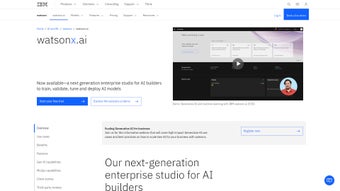

Download WatsonX.ai – AI Writing Assistant for Enterprises, Secure & Scalable
Overview of WatsonX.ai
WatsonX.ai, IBM’s latest AI‑driven writing assistant, is built specifically for enterprise‑level demands. It blends generative AI with classic machine‑learning pipelines, giving organizations a single, secure hub to design, train, validate, tune, and deploy AI models. As a subscription‑based web application, WatsonX.ai eliminates the friction of juggling multiple tools, letting data scientists and business analysts focus on outcomes rather than infrastructure.
The platform’s open‑source framework support means you can tap into popular libraries such as TensorFlow, PyTorch, and Scikit‑Learn while still benefitting from IBM’s robust security and governance layers. Whether you need to draft job descriptions, classify customer complaints, summarize dense reports, or extract sentiment from feedback, WatsonX.ai provides a visual, automated data‑science experience that reduces time‑to‑value. The integrated SDK and extensive API library empower developers to embed custom AI capabilities directly into existing workflows, ensuring that the tool scales with the organization’s evolving needs.
In short, WatsonX.ai is more than a writing assistant; it is a full‑cycle AI development environment that promises speed, security, and flexibility for modern businesses seeking to harness AI with minimal data preparation and overhead.
Key Features & Capabilities
What Sets WatsonX.ai Apart
- Unified Model Lifecycle Management: From data ingestion to deployment, everything is handled within a single interface, reducing context switching.
- Generative AI & Prompt‑Tuning: Create high‑quality text, code, or summaries with advanced prompt‑engineering tools that adapt to your domain.
- Open‑Source Framework Compatibility: Seamlessly integrate TensorFlow, PyTorch, Scikit‑Learn, and Hugging Face models.
- Automated Data‑Science Workflows: Visual pipelines that automate preprocessing, feature engineering, and model selection.
- Robust Security & Governance: Role‑based access control, data encryption at rest and in transit, and audit logs meet enterprise compliance standards.
- Extensive SDK & API Library: Over 150 pre‑built endpoints for model training, inference, and monitoring, enabling deep customization.
- Enterprise‑Ready Collaboration: Shared workspaces, version control, and comment threads keep cross‑functional teams aligned.
- Insight Extraction Tools: Built‑in sentiment analysis, entity extraction, and summarization modules turn raw text into actionable intelligence.
- Scalable Cloud Infrastructure: Automatic scaling on IBM Cloud ensures performance under heavy workloads without manual provisioning.
- Continuous Model Monitoring: Real‑time drift detection and performance dashboards help maintain model reliability over time.
Each of these capabilities is designed to address common pain points in enterprise AI adoption. For instance, the unified lifecycle reduces the need for separate MLOps tools, while prompt‑tuning accelerates content generation without sacrificing quality. The platform’s security framework is especially important for regulated industries such as finance and healthcare, where data privacy is non‑negotiable. Moreover, the visual pipelines democratize AI development, allowing non‑technical stakeholders to contribute to model design through drag‑and‑drop interfaces. Combined, these features make WatsonX.ai a comprehensive solution that can be deployed across a variety of business scenarios—from HR and marketing to compliance and product development.
Installation, Usage Guide & Compatibility
Getting Started in Minutes
Because WatsonX.ai is delivered as a SaaS offering, there is no traditional installation on local machines. Users simply sign up for an IBM Cloud account, select the WatsonX.ai subscription tier that matches their needs, and launch the web portal from any modern browser. The onboarding wizard walks you through organization setup, user role assignment, and initial data source connections (e.g., IBM Cloud Object Storage, Amazon S3, or on‑premise databases). After the basic configuration, you can start building projects using the visual pipeline editor or the command‑line SDK.
Step‑by‑Step Usage
- Create a Project: Define the business objective, upload or connect to your data, and choose a template (e.g., “Text Summarization” or “Sentiment Classification”).
- Prepare Data: Use built‑in data profiling tools to clean, label, and split data automatically.
- Train a Model: Select a pre‑trained foundation model or start from scratch. Adjust hyper‑parameters via the UI or by supplying a JSON configuration file.
- Validate & Tune: Run cross‑validation, examine performance metrics, and apply prompt‑tuning or hyper‑parameter optimization to improve results.
- Deploy: Publish the model as a REST endpoint with a single click. Set scaling policies and monitoring alerts.
- Integrate: Consume the endpoint via the SDK (available for Python, Java, Node.js) or embed it directly in low‑code platforms such as IBM Business Automation Workflow.
- Monitor & Iterate: Use the dashboard to track latency, error rates, and data drift, then retrain as needed.
Supported Operating Systems & Browsers: Since WatsonX.ai runs in the cloud, it is compatible with any OS that supports a modern web browser—Windows 10/11, macOS Monterey and later, Linux distributions, as well as mobile platforms (iOS 14+, Android 9+). For SDK usage, the supported development environments include Windows, macOS, and Linux, with Python 3.8+, Java 11+, and Node.js 14+.
The platform also offers CLI tools for Linux and macOS that enable scripting of batch jobs and CI/CD integration. Enterprise customers can connect WatsonX.ai to on‑premise VPNs or private links for data residency compliance, ensuring that all traffic stays within controlled network zones.
Pros, Cons & Frequently Asked Questions
Pros
- All‑in‑one lifecycle management reduces tool sprawl.
- Strong security and compliance features suitable for regulated industries.
- Extensive open‑source framework support for flexibility.
- Powerful prompt‑tuning that accelerates content creation.
- Scalable cloud infrastructure with automatic resource provisioning.
Cons
- Subscription pricing may be higher than some niche SaaS alternatives.
- Steeper learning curve for teams new to MLOps concepts.
- Limited offline capabilities due to its SaaS nature.
- Advanced features (e.g., custom model registry) require higher‑tier plans.
Frequently Asked Questions
Is there a free trial available for WatsonX.ai?
Yes, IBM offers a 30‑day free trial that includes access to all core features, allowing organizations to evaluate the platform before committing to a paid subscription.
Can WatsonX.ai be integrated with existing CI/CD pipelines?
Absolutely. The platform provides REST APIs and CLI commands that can be scripted into Jenkins, GitHub Actions, or Azure DevOps pipelines for automated model training, testing, and deployment.
What data privacy measures are in place?
WatsonX.ai encrypts data at rest and in transit, offers role‑based access control, audit logging, and complies with GDPR, HIPAA, and other industry regulations.
Does WatsonX.ai support multi‑language models?
Yes, the platform includes pre‑trained multilingual models and allows you to fine‑tune them on custom corpora, making it suitable for global enterprises.
How does the prompt‑tuning feature differ from standard fine‑tuning?
Prompt‑tuning adjusts the input prompts to steer a large language model’s behavior without modifying the underlying weights, which is faster and requires less data than full fine‑tuning.
Conclusion – Why WatsonX.ai Is a Strategic AI Investment
In today’s competitive landscape, enterprises cannot afford fragmented AI workflows that drain resources and increase risk. WatsonX.ai delivers a cohesive, secure, and scalable environment that consolidates every stage of the AI model lifecycle—from data preparation to production monitoring—under a single roof. Its blend of generative AI capabilities, robust prompt‑tuning, and deep integration with open‑source frameworks equips businesses to accelerate innovation while maintaining strict governance. Although the subscription model may require a higher upfront commitment, the time saved on tool integration, the reduction in operational overhead, and the ability to quickly generate high‑quality content and insights provide a compelling ROI. For organizations looking to future‑proof their AI strategy, WatsonX.ai offers a reliable, enterprise‑grade foundation that can evolve alongside emerging AI technologies.
Ready to transform your AI development workflow? Start your free trial of WatsonX.ai today and experience a secure, end‑to‑end platform that turns data into actionable intelligence faster than ever before.
WatsonX.ai ReviewWatsonX.ai impresses with its comprehensive feature set and enterprise‑grade security. While the pricing may be a barrier for small teams, the platform’s ability to centralize AI development, provide powerful prompt‑tuning, and integrate seamlessly with existing workflows makes it a top choice for large organizations seeking to scale AI responsibly.
Pros: Unified lifecycle, strong security, extensive SDK.
Cons: Higher cost, learning curve for newcomers.



.png)



